Thanks @woland, yes, I guessed it might be a hardwired bit of processing taking place in the Kinect itself. The sensor isn't perfect but I guess it's the best there is, particularly considering the price. Is there any other skeletal tracking system that you've come across recently? I'm still using the Kinect 1 and 2, but noticed some artists are using the Azure. Wondering if there is any advantage from a false-tracking point of view, apart from resolution being better?


Hiya friends,
I have run into this problem so many times and finally found the easy solution, so I figured I would share it for those who may have struggled like I have.
EOS formats its OSC Go command info as "/eos/out/event/cue/1/4/fire" with 1 in this example being the cue list and 4 being the cue #, without data attached to this stream address. This makes it a bit unintuitive to pull the cue number into Izzy. To get the cue # in data format requires sending a custom string from Eos.
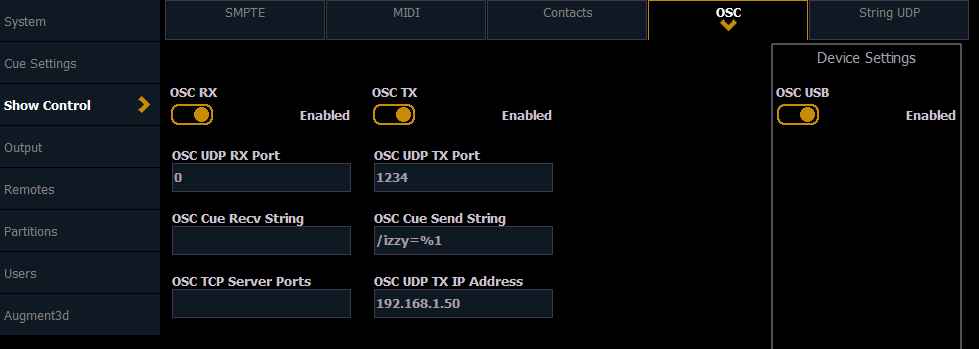
The custom string to send is "/<address>=%1" (%1 is replaced internally by Eos with the cue number fired)
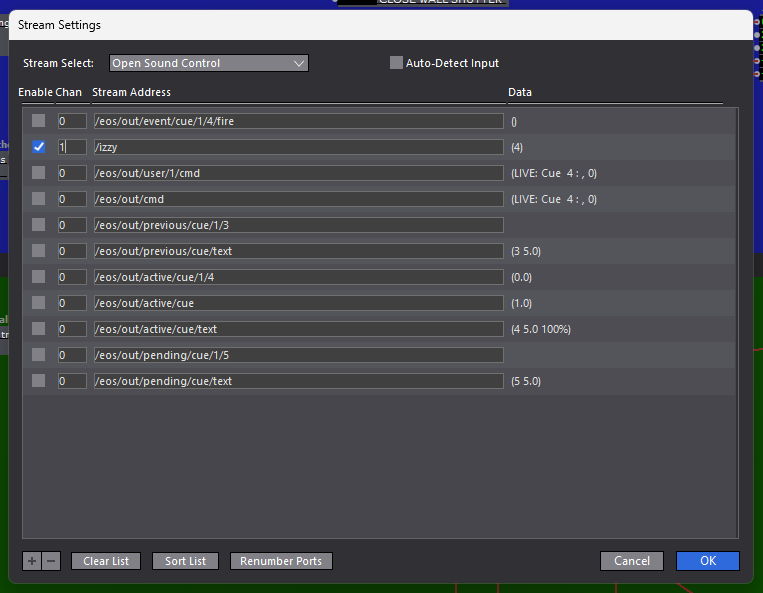
This lets the cue number come in as something you can send to the Jump to Cue actor.
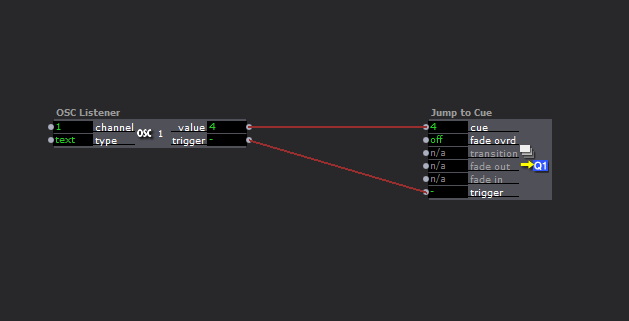
Hope this helps someone.
Best
D
@lpmode Any solutions? I am currently having this same issue, amd I am using PJLink actors
I just had the same thing occur on our show. We installed the Send PJLink plugin and started getting both a) crashes with no warnings or b) all the actors in the scene would disappear and Isadora would stop responding and we would have to force quit.
For us, the crashing errors would occur even in scenes without the plugin actor.
We're currently in tech, running Isadora 3 USB Key, and unfortunately I can't give you system details right now but we're running Windows. I'll try to get in tomorrow morning to update this with more information!
@nic said:
wondered if it’s possible to set a threshold distance for skeletal detect?
I don't think so (and unfortunately it's not our code so I don't think it's something we can change), but what you could do is use the Skeleton Visualizer actor to show the skeletons instead of the built-in 'draw skeletons' and then use Skeleton Decoders + Comparator actors to make logic that fades out any skeleton if, for example, the torso's z value (depth) exceeds a certain number (compare mode 'ge' with Comparator's 'value1' connected to the Skeleton Decoder and the 'value2' set to whatever value you determine is adequate for the cut-off). You could also use the same principle, but instead of
I did build something to fade out the video if only a skeleton is showing, but I came back and realized that I'd misread your post, so I solved a problem you actually don't have. Here it is anyway, in case any of it is useful: https://www.dropbox.com/scl/fo/u5qdfla1s485qij3uw45c/h?rlkey=1rc6eg9j63z53nhahyu2wowg7&dl=0
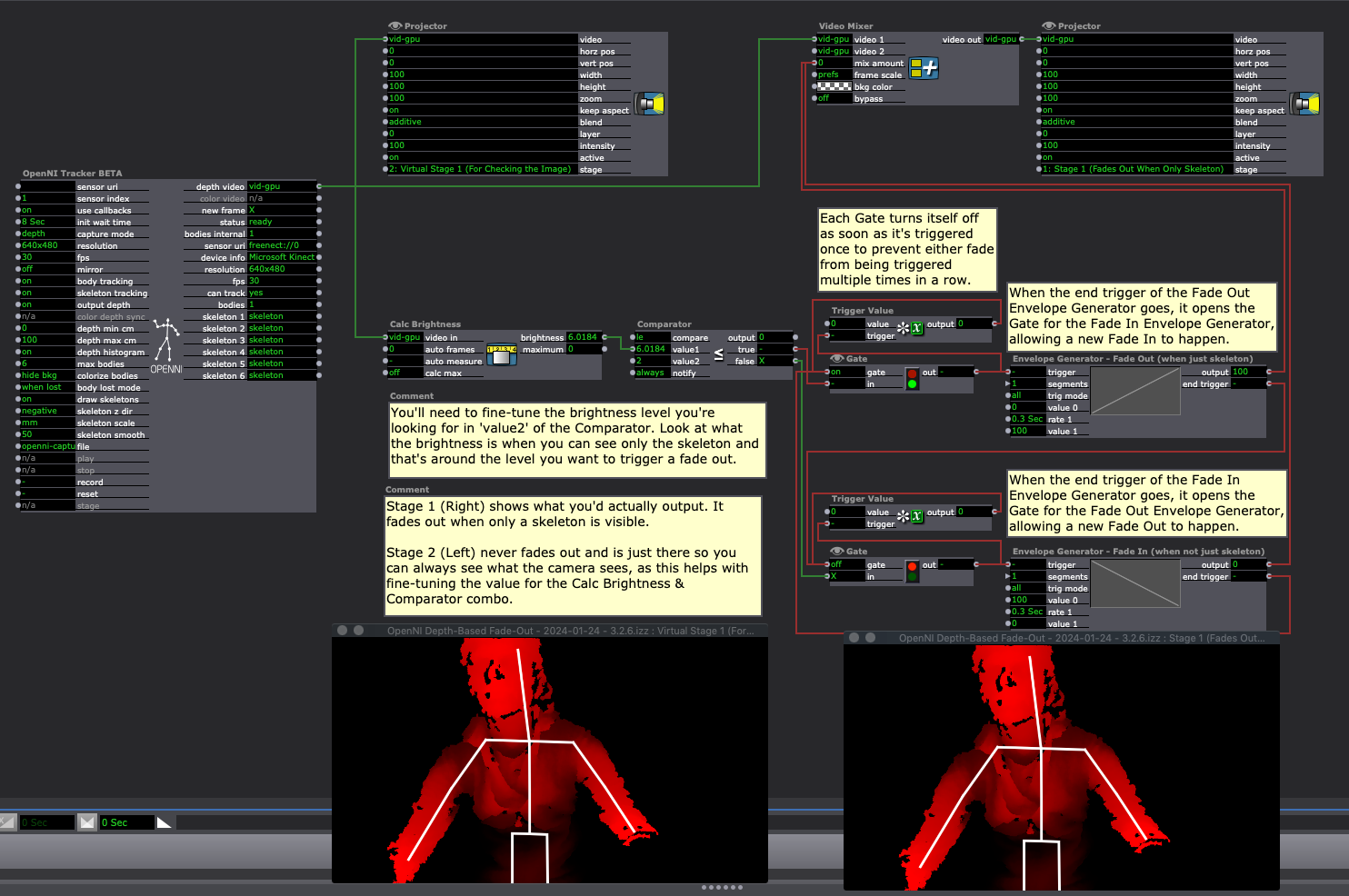
Hi all,
I’m currently using the OpenNI actor with Kinect and wondered if it’s possible to set a threshold distance for skeletal detect? I can see there’s a Max/Min depth, which can exclude bodies further than a set distance (i.e. I can see that recognised bodies start to lose their colour intensity beyond the set distance); however if someone (or something) is beyond this threshold, the Kinect still recognises and assigns a skeletal form, visible on screen if draw skeletons is checked.
This is problematic for installations with background clutter that is mis-recognised as a body. It ‘steals’ the skeleton that a participant would ordinarily be assigned.
Thanks,
Nic
@dbini understood and bravo on making a (slow) path for organizations to work in sustainable ways. We're using the mocap to create a choreography that really plays with "invisible forces" to explore the concept. We went on a discovery tour the mocap studio last week and it spawned a lot of movement ideas. I'll end up doing a lot of work in Blender and may end up using Isadora to create some audio and visual reactive animation.
hiya @mark_m
potentially some time around 16th-23rd November - tied in with a dance festival there