• Products
    • Isadora
    • Get It
    • ADD-ONS
    • IzzyCast
    • Get It
  • Forum
  • Help
  • Werkstatt
  • Newsletter
  • Impressum
  • Dsgvo
  • Press
  • Isadora
  • Get It
  • ADD-ONS
  • IzzyCast
  • Get It
  • Press
  • Dsgvo
  • Impressum
    • Categories
    • Recent
    • Tags
    • Register
    • Login

    [ANSWERED] resize picture used as alpha channel mask

    Scheduled Pinned Locked Moved How To... ?
    3 Posts 3 Posters 231 Views 2 Watching
    Loading More Posts
    • Oldest to Newest
    • Newest to Oldest
    • Most Votes
    Reply
    • Reply as topic
    Log in to reply
    This topic has been deleted. Only users with topic management privileges can see it.
    • A Offline
      Ariana
      last edited by Woland

      png in picture actor used as alpha mask works except I need to resize it.

      What can I add, use, to adjust the size before it is sent to the alpha mask?

      C D 2 Replies Last reply Reply Quote 0
      • C Offline
        CitizenJoe @Ariana
        last edited by

        @ariana 

        zoomer?

        Cheers,

        Hugh

        Hugh in Winnipeg - All test machines, Win10 Pro, 64 bit, OS SSD and separate data SSD.

        1. new laptop: Dell 7560, i9 11950H, 64 gigs, NVIDIA RTX A4000 w/8 GB GDDR6
        2. old desktop: Dell T5500 2009, Dual Quad Core Processor E5530, 12 gigs, 2x Radeon 5750... Still works well!
        1 Reply Last reply Reply Quote 1
        • D Offline
          DusX Tech Staff @Ariana
          last edited by

          @ariana said:

          to adjust the size before it is sent to the alpha mask?

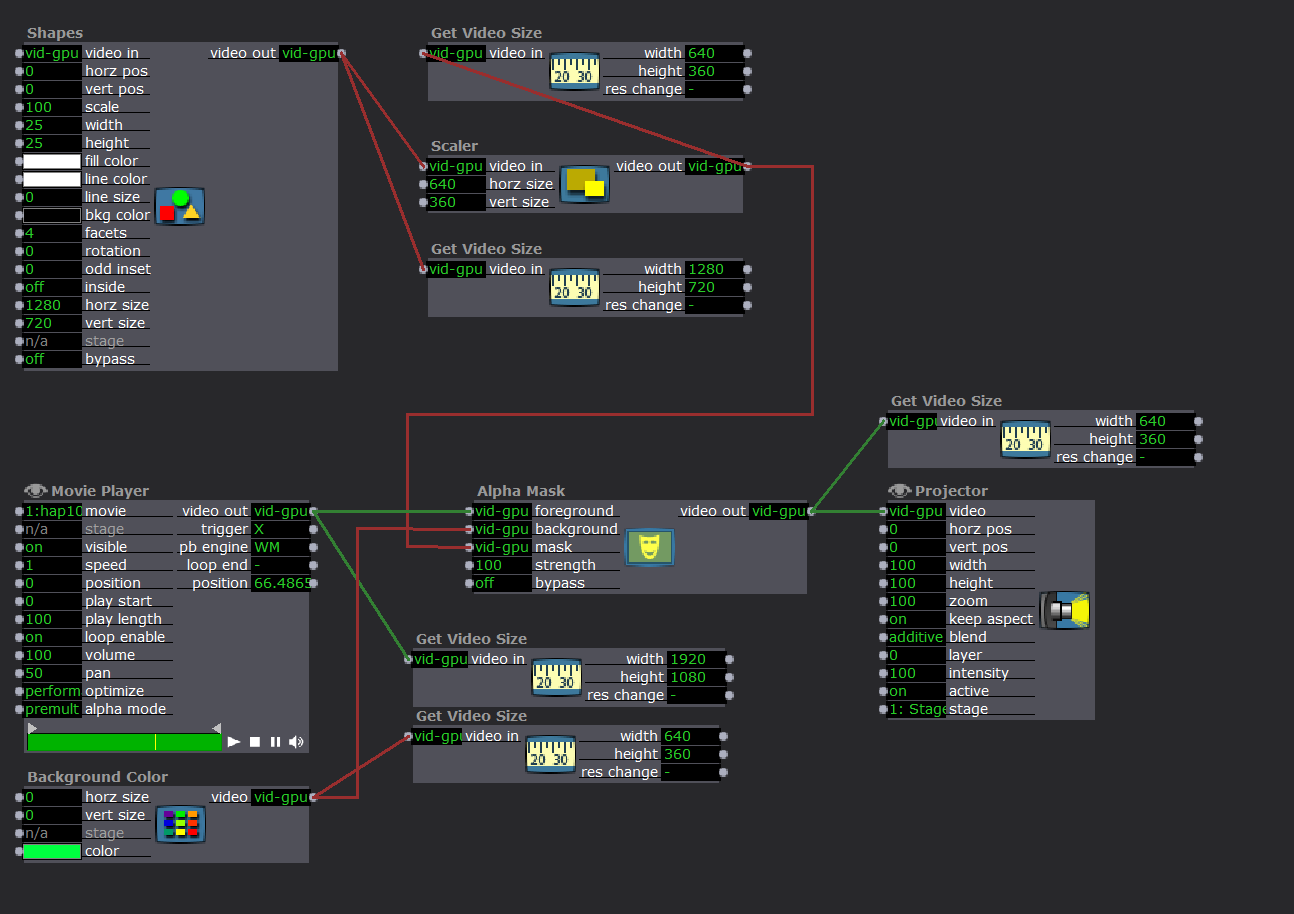
           Below I have used a Shapes actor in place of the Picture Player you will be using for a PNG file, but the rest should be similar to what you are doing. I have added a number of Get Video Size actors to show how the resolutions are being set, and combined (using default Isadora settings).
          The Scaler actor is the actor used here to resize the image.
          Troikatronix Technical Support

          • New Support Ticket Link: https://support.troikatronix.com/support/tickets/new
          • Isadora Add-ons: https://troikatronix.com/add-ons/
          • My Add-ons: https://troikatronix.com/add-ons/?u=dusx

          Running: Win 11 64bit, i7, M.2 PCIe SSD's, 32gb DDR4, nVidia GTX 4070 | located in Ontario Canada.

          1 Reply Last reply Reply Quote 1

          Hello! It looks like you're interested in this conversation, but you don't have an account yet.

          Getting fed up of having to scroll through the same posts each visit? When you register for an account, you'll always come back to exactly where you were before, and choose to be notified of new replies (either via email, or push notification). You'll also be able to save bookmarks and upvote posts to show your appreciation to other community members.

          With your input, this post could be even better 💗

          Register Login
          • First post
            Last post