• Products
    • Isadora
    • Get It
    • ADD-ONS
    • IzzyCast
    • Get It
  • Forum
  • Help
  • Werkstatt
  • Newsletter
  • Impressum
  • Dsgvo
  • Press
  • Isadora
  • Get It
  • ADD-ONS
  • IzzyCast
  • Get It
  • Press
  • Dsgvo
  • Impressum
    • Categories
    • Recent
    • Tags
    • Register
    • Login

    3D Pariticles actor troubles

    Scheduled Pinned Locked Moved Troubleshooting and Bug Reports
    7 Posts 4 Posters 552 Views 1 Watching
    Loading More Posts
    • Oldest to Newest
    • Newest to Oldest
    • Most Votes
    Reply
    • Reply as topic
    Log in to reply
    This topic has been deleted. Only users with topic management privileges can see it.
    • E Offline
      Eva
      last edited by

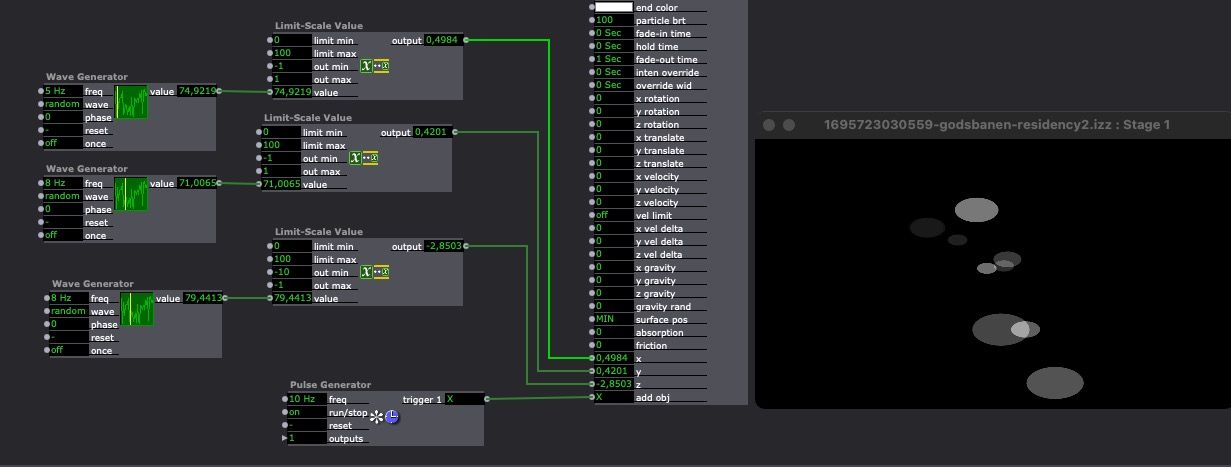
      Hi there,I am presently setting up a small map to trace a person with the 3D particles actor.
      For some reason presently and yesterday, I have found that it will only draw a dot if the x/y coordinate is = 0, if I change that, to another number, there is no particle appearing. The z is -1 so that should not be the problem. Is there a bug? or am I doing something wrong? It has worked before for me, but not now...
      All the best Eva

      Eva Esmann Behrens
      Labtop: Macbook pro (Retina) 2015, 2,7 GHz,8 GB, MacOS Mojave
      Mac Studio

      E B 2 Replies Last reply Reply Quote 0
      • E Offline
        Eva @Eva
        last edited by

        Just adding the patch - it is the scene called "map test": godsbanen-residency2.izz

        Eva Esmann Behrens
        Labtop: Macbook pro (Retina) 2015, 2,7 GHz,8 GB, MacOS Mojave
        Mac Studio

        J 1 Reply Last reply Reply Quote 0
        • J Offline
          jfg @Eva
          last edited by

          @Eva

          I think you must use a Limit-scale value actor and set the out min to -1 and out max to 1 for x and y
          Best regards, 

          Jean-François

          • Izzy 3.2.6, Mac OS 14.1 Sonoma:
          - MacBook Pro M1 Max 16" 64GB RAM
          • Izzy 3.2.6, Mac OS 10.14.6 (Mojave):
          - Mac Pro 5.1 middle 2012 (3,33 GHz 6-Core Intel Xeon, 32GB RAM, Radeon RX 580 8 GB )
          - MacBook Pro 2015 (16GB RAM) 2,8 GHz Intel Core i7;

          Located in Bremen, Germany

          1 Reply Last reply Reply Quote 0
          • B Offline
            bonemap Izzy Guru @Eva
            last edited by bonemap

            @eva

            Hi,

            I have looked over your patch and have replicated your data input. You will need to reduce your 'limit scale value' outputs to a smaller range i.e. try '-5, 5'

            godsbanen-residency2_bonemap.izz

             @jfg 'limit scale Actor' suggestion is good, and I also recommend using a '3D Stage Orientation' to manipulate the global 3D scene values.

            3d-particle-test.izz

            Best Wishes,

            Russell

            http://bonemap.com | Australia
            Izzy STD/USB 3.2.6 | + Beta 3.x.x
            MBP 16” 2019 2.4 GHz Intel i9 64GB AMD Radeon Pro 5500 8 GB 4TB SSD | 14.1.2 Sonoma
            Mac Studio 2023 M2 Ultra 128GB | OSX 14.1.2 Sonoma
            A range of deployable older Macs

            E 1 Reply Last reply Reply Quote 0
            • E Offline
              Eva @bonemap
              last edited by

              @bonemapAh, I see, also there is something about the z actor. Thank you for helping:)

              Eva Esmann Behrens
              Labtop: Macbook pro (Retina) 2015, 2,7 GHz,8 GB, MacOS Mojave
              Mac Studio

              D 1 Reply Last reply Reply Quote 1
              • D Offline
                dbini @Eva
                last edited by

                @eva


                having the z at -1 doesn't give you much space to move your particles around. i usually start with z at -100.

                John Collingswood
                taikabox.com
                2013 MBPR 2.3GHZ i7 OSX11.7.4 16GB
                & 2019 MBPT 2.6GHZ i7 OSX12.3 16GB

                E 1 Reply Last reply Reply Quote 1
                • E Offline
                  Eva @dbini
                  last edited by

                  @dbini

                  Yup, thanks!

                  Eva Esmann Behrens
                  Labtop: Macbook pro (Retina) 2015, 2,7 GHz,8 GB, MacOS Mojave
                  Mac Studio

                  1 Reply Last reply Reply Quote 0

                  Hello! It looks like you're interested in this conversation, but you don't have an account yet.

                  Getting fed up of having to scroll through the same posts each visit? When you register for an account, you'll always come back to exactly where you were before, and choose to be notified of new replies (either via email, or push notification). You'll also be able to save bookmarks and upvote posts to show your appreciation to other community members.

                  With your input, this post could be even better 💗

                  Register Login
                  • First post
                    Last post