• codec poll

    How To... ?
    1
    0 Votes
    1 Posts
    32 Views
    MichelM
  • Body track with OptiTrack and Motive in Isadora

    How To... ?
    1
    0 Votes
    1 Posts
    116 Views
    E
    Hallo, I am researching the possibility of working with a motion capture system that uses Optitrack and a software called Motive, and to get the data captured in Isadora. I found a post from 2018 (https://community-test.troikatronix.com/topic/4920/body-mapping-how-to-do) that mentions Optitrack, but maybe there is some news since then on how to get the data into Isadora. Any chance I can avoid coding or expensive 3rd-party software to do so? Any experience or advice shared is much appreciated. Thanks Elena Tilli
  • Looking for Multichannel Audio interface for windows

    Hardware
    1
    0 Votes
    1 Posts
    221 Views
    G
    Re: Multichannel Audio Interfaces under Windows for Theater Productions: Which One? Hi there I've opened a new thread since the other one was quite old. Last weekend my focusrite8i6 3rd generation failed twice during performance. Once on W11 using ableton and once on W10 using Isadora. I'm not even sure it is the Soundcard, but it is my best guess. Since I can not afford this, I'm looking for alternatives. I need at least two analogue inputs and 4 outputs. I know Focusrite has released the 4th gen and there should be improvements. However driver issues, specially in windows, seem to be an issue with the Focusrite. I've been looking for the MOTU 4 as the alternative to go for. But @Fred mentioned in his "older" post that he also had issues with MOTU and would go with RME. Any suggestions on which interface, at best including brand and model, to get these days would be greatly appreciated. Cheers
  • resolution

    How To... ?
    6
    1 Votes
    6 Posts
    1k Views
    JuriaanJ
    @DusX said in resolution: above image was very large That is amazing!
  • This is a topic

    How To... ?
    1
    0 Votes
    1 Posts
    429 Views
    JuriaanJ
    I love this type of topics This is a bold text
  • My Amazing topic!

    How To... ?
    4
    0 Votes
    4 Posts
    801 Views
    D
    @Juriaan said in My Amazing topic!: [image: 1712700275912-0bb0d4c4-5de1-40fb-ac2b-489b6d3eae8b-image.png] This new editor allows you to just copy an image! And it works Quote seems to add a bunch more than i select How does copy image work?
  • This is my amazing topic

    How To... ?
    3
    0 Votes
    3 Posts
    580 Views
    JuriaanJ
    Markdown syntax guide Headers This is a Heading h1 This is a Heading h2 This is a Heading h6 Emphasis This text will be italic This will also be italic This text will be bold This will also be bold You can combine them Lists Unordered Item 1 Item 2 Item 2a Item 2b Ordered Item 1 Item 2 Item 3 Item 3a Item 3b Images [image: sample.webp] Links You may be using Markdown Live Preview. Blockquotes Markdown is a lightweight markup language with plain-text-formatting syntax, created in 2004 by John Gruber with Aaron Swartz. Markdown is often used to format readme files, for writing messages in online discussion forums, and to create rich text using a plain text editor. Tables Left columns Right columns left foo right foo left bar right bar left baz right baz Blocks of code let message = 'Hello world'; alert(message); Inline code This web site is using markedjs/marked.
  • 0 Votes
    1 Posts
    393 Views
    JuriaanJ
    Hello world! This is a topic that I started that I want to chat about.. This is a bold text!
  • Syphon

    Third Party Software
    3
    2 Votes
    3 Posts
    661 Views
    J
    @jisa https://github.com/Syphon/Simple/releases      Syphon.Simple.Apps.zip       Best regards,  Jean-François 
  • Issue with capture stage

    Troubleshooting and Bug Reports
    5
    1 Votes
    5 Posts
    808 Views
    D
    @bramMP4 is the preferred codec since it uses a newer Windows system, but you are correct Palindrome isn't a useable playback option with this codec. Here are some codec specs I recorded sometime ago:Known Bad Codecs:Decklink MJPEG CompressorMicrosoft RLEMicrosoft YUVToshiba YUVKnown Working Codecs:DV video encoder (DS)Hap (vfw)HapA (vfw)HapQ (vfw)Intel IYUV (vfw)MJPEG Compressor (DS)MSScreen 9 Encoder (DMO)MS Video 1 (vfw)WMVideo8 encoder (DMO)WMVideo9 encoder (DMO)Black Magic HD 8 bit 4:2:2Black Magic 8 bit MJPEGBlack Magic 10 bit 4:4:4Black Magic 10 bit 4:2:2 Performance Grid: (cpu usage comparison during record of 30 sec clip at 1280x720, 30fps, 75% quality) Average cpu usage at runtime of test patch is 14-18% and gpu usage also 10-14% Note: all recorded values are +- 2-3% and at start of record generally have a spike in usage not included in these usage stats. CODECCPU usageGPU usageDV video encoder (DS)34%13%Hap (vfw)52%13%HapA (vfw)53%13%HapQ (vfw)53%13%Intel IYUV (vfw) *28%13%MJPEG Compressor (DS)46%13%MSScreen 9 Encoder (DMO)46%13%MS Video 1 (vfw)31%13%WMVideo8 encoder (DMO)47%13%WMVideo9 encoder (DMO)47%13%Black Magic HD 8 bit 4:2:227%13%Black Magic 8 bit MJPEG30%13%Black Magic 10 bit 4:4:430%13%Black Magic 10 bit 4:2:228%13% * This video format does not playback in the correct color in Isadora since YUV support is dropped in Isadora 3 -------------------------------------------------------------------------------------------------------------------------------So based on these results, I lean towards using the 8-bit BlackMagic codecs myself. (installed with free blackmagic software)
  • Serial In Header Sync?

    Interfacing
    1
    2
    0 Votes
    1 Posts
    485 Views
    N
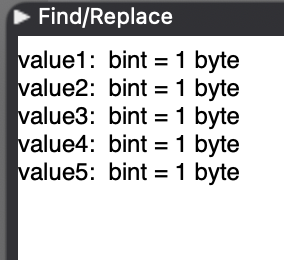
    Hi everyone, I've been struggling to receive a synchronised series of byte data on my serial port (sent by an arduino). The arduino sends a header of 255, followed by four bytes which I need to read in Isadora.  the problem is that I can't figure out how to get the "Serial In Watcher - Binary" to wait for the header and then output the following four bytes in the right order. my actor looks like this (note that the 255 is in the correct place sent out on value1, but this isn't always the case as it keeps jumping around to the other value outputs):  and the settings look like this: (note that none of my data values will be 255, I've reserved this for the header)I'm guessing that Value1 needs to wait until it sees 255, but can't figure out how to do this in the documentation. any help appreciated!
  • MELBOURNE & ADELAIDE

    Job Opportunities
    4
    3 Votes
    4 Posts
    715 Views
    V
    @opmeyer Hey I only just saw your post. Glad you have found someone. I was actually out of the country at the time and I am currently doing a gig in Mount Gambier. If you're looking for someone in the future, please get in touch. I am based in Castlemaine but happy to travel. I am familiar with Isadora, Madmapper, Qlab and VDMX. Also pretty solid on Adobe. I also Have a friend/colleague with over 10 years experience with Izzy.CheersJim
  • 6 Votes
    5 Posts
    922 Views
    B
    @fredThanks, @fred. I have an implementation of MediaPipe constructed using the Isadora Pythoner beta module. However, as the version of Isadora with Pythoner has yet to be released, these options provide an alternative. I will have a look at PoseOSC, too.Best WishesRussell
  • 0 Votes
    7 Posts
    1k Views
    O
    @opmeyerThe solution here:BING copilot translated the JSON to HEX and pasted it in the TCP send actor. Worked straight away!{"jsonrpc": "2.0","method": "system.poweron"}7b 22 6a 73 6f 6e 72 70 63 22 3a 20 22 32 2e 30 22 2c 22 6d 65 74 68 6f 64 22 3a 20 22 73 79 73 74 65 6d 2e 70 6f 77 65 72 6f 6e 22 20 7d {"jsonrpc": "2.0","method": "system.poweroff" }7b 22 6a 73 6f 6e 72 70 63 22 3a 20 22 32 2e 30 22 2c 22 6d 65 74 68 6f 64 22 3a 20 22 73 79 73 74 65 6d 2e 70 6f 77 65 72 6f 66 66 22 20 7d
  • 0 Votes
    22 Posts
    4k Views
    N
    @mark ok. I'll open a ticket to get the new Leap Motion plugin. Thanks! and thanks to @tomthebom @Armando
  • 0 Votes
    3 Posts
    426 Views
    WolandW
    @koolsteelerThe simplest way would be to use the Capture Stage to Picture actor to get a still image "thumbnail" of what each Scene looks like, then put a Picture Player actor in each Scene showing the picture taken of the next scene, and link the output of the Picture Player actor to a Monitor Control.
  • 0 Votes
    5 Posts
    579 Views
    D
    @video-architect Non of the listed software tools are capable of doing a perfect mapping of this curvy front easily. Only very expensive media server, like disguise or Pixera can do the 3D calculations on the fly and add accurate edge blend. considering your very short time frame, I would go the simplest route. Just do separate layers. There are several ways to generate several layers in Isadora. For the most flexible way, use multiple projectors per scene. Every projector offers his own layer value and izzi map function. With the right blend mode set, you can send these projectors to the same stage.Projector/ Layer 1: The background with pre cut video or a masking in izzi map.Projector/ Layer 2: The pillars and general front.You could even go with a projector actor for each object you'd like to map separately. For the masking use an extra layer which goes to a virtual stage. With this you can do a very flexible (alpha-) masking within izzy map. Do this for every layer you feel to need a separate mapping. If you need to warp each layer separately, pipe them through a virtual stage as well, before finally adding them to the masking layer with the keying (a separate one, then) An edge blend is very complex here (as is the whole thing because of the curves and levels).But you can do a simple manual edge blend with a similar technique, using a virtual stage and do the edge blend actor on it. Regarding the calculations for the hardware projectors, you should use the foremost front as the projection screen. everything behind it, will be overlapping anyway. PS: I used a chroma key for the masks, as in my experience the luma doesn't work as well.

  • 2 Votes
    3 Posts
    937 Views
    C
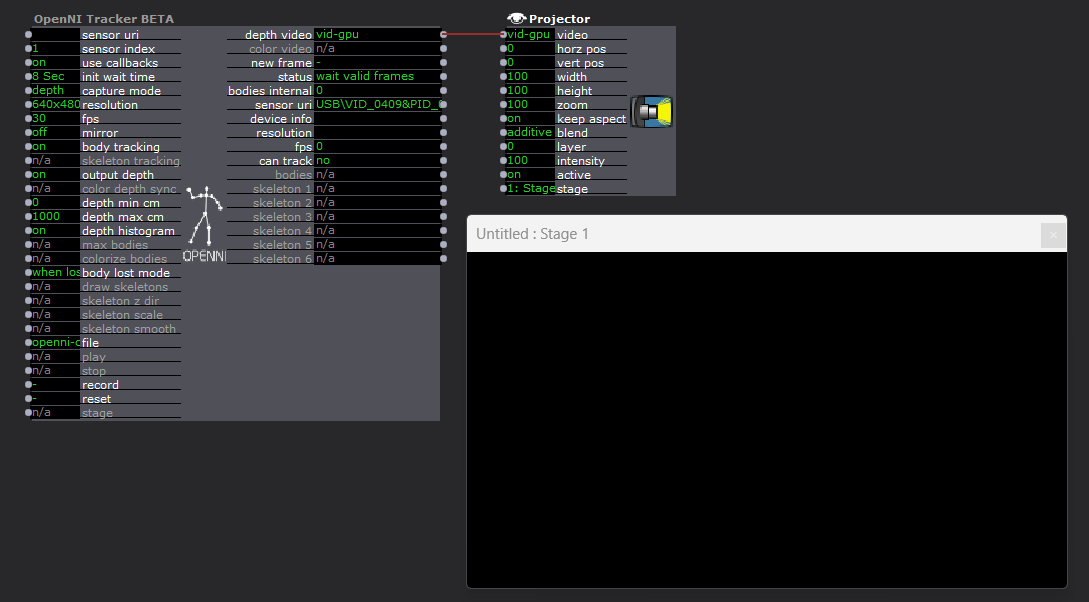
    @dusx Thank you, I think it must have been a corrupted system lib. I had to re-install Windows 11 a few days after my initial post due to a corrupted graphics driver, and now with a clean pass on sfc the Kinect is properly providing input to Isadora.
  • [ANSWERED] Waterfall (particles) simulation

    How To... ?
    17
    0 Votes
    17 Posts
    2k Views
    R
    @bonemap wow !!! Looks amazingThanks for shearing. BestMaxi RIL
  • 0 Votes
    13 Posts
    1k Views
    Z
    It's the hdmi output from another mac.Resolution is 1080p60.I tried the three video setup (scale to smallest, largest, default).With or without antialiasing...Anyway, i tried it on a new patch, video in watcher straight to projector, so there should be no scaling nowhere.When i let the mouse on the link, it tells the output from the video in watcher in 1080p60For now, i'm using spout/syphon from madmapper to have the good image quality.Once again, the setup was tested both on mac and pc, with a decklink duo 2 and a decklink 8k pro.