• Isadora
  • Get it
  • Forum
  • Help
  • ADD-ONS
  • Newsletter
  • Impressum
  • Dsgvo
  • Impressum
Forum
    • Categories
    • Recent
    • Popular
    • Tags
    • Register
    • Login
    1. Home
    2. Categories
    3. How To... ?
    Log in to post
    Load new posts
    • Recently Replied
    • Recently Created
    • Most Posts
    • Most Votes
    • Most Views
    • I

      [ANSWERED] Control Panel Indication

      control control panel • • iblock
      3
      0
      Votes
      3
      Posts
      511
      Views

      JuriaanJ

      @dusx said:

      more for shutter status? 

      %1AVMT ?

      Class 1 command.

    • C

      question - control video camera???

      • • Cacoos
      6
      1
      Votes
      6
      Posts
      264
      Views

      liminal_andyL

      @cacoos Very good. Create your presets with a conventional controller or the Panasonic utility. It stores them in the camera body. Then, recall presets with the format I provided in my post. You can even check to see if they succeed or fail 🙂

    • plemP

      [ANSWERED] Pitch yaw roll to rotation...

      3d object midi control javascript • • plem
      4
      0
      Votes
      4
      Posts
      720
      Views

      plemP

      @mark

      Great. Flawless. Exactly what I meant.

      Thanks! Peter

    • A

      [ANSWERED] How To Turn Actor Names Back On

      nodes titles • • alice
      4
      0
      Votes
      4
      Posts
      238
      Views

      phspragueP

      @liminal_andy so good to see you out here answering Izzy troubleshooting requests. Squaaaaaad! I have noticed some really heavy leaf accumulation in my front yard, and wondering if you have any insights?

    • BennnidB

      2 networks for OSC: how to use wifi and rj45 to send / receive on both ?

      local network send data touch osc • • Bennnid
      7
      0
      Votes
      7
      Posts
      1.3k
      Views

      LPmodeL

      Isadora and OSC works fine on multiple network interfaces

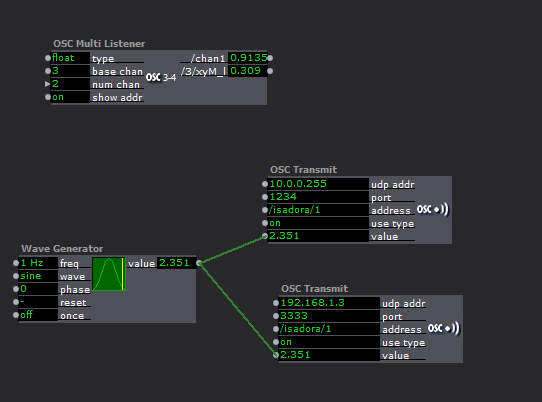
      Here is an example config with the ethernet interface at 192.168.1.1  and a Wi-Fi interface at 10.0.0.50

      A sender device ( eg. TD or qlab) interface is 192.168.1.2. In the application preferences, set OSC address (host, or destination or listener or udp -meaning isadora here) to  192.168.1.1  

      A listener, ATEM mini is on the same LAN at 192.168.1.3:3333 - Here, adjust Isadora's OSC Transmit actor to match ATEM's device address. 

      A wireless control device (touch OSC/phone) at 10.0.0.22. Isadora is on the 10.0.0.50 interface there so my phone's TouchOSC prefs need to be set to send to Isadora at 10.0.0.50

      192.168.1.255 can also be used to broadcast the values to all devices in the 192.168.1.xxx network. Similarly, 10.0.0.255 will broadcast to all devices on the 10.0.0.xxx network.

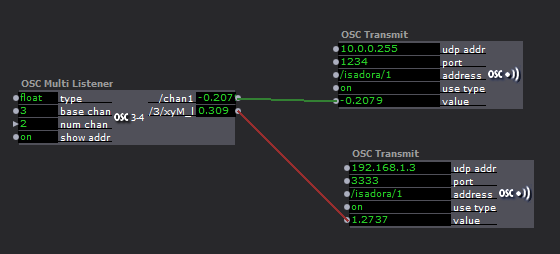
       Here is an example of using OSC over two interfaces.  on the listener /Chan1 is a from a PC with no wifi. just a direct cable with static IP  TD. 
      The /3/xyM+i coming from my phone over the home WI-FI

      If you want devices on different networks to communicate to each other then you need to consolidate the network so they are on the same network, but that's an IT solution.  Nevertheless, Isadora can overcome that if you use it as a pass through. It's a good way if you want to limit ranges and have conditions or rename the address of the values to be forwarded. 
    • M

      [ANSWERED] TCP or UDP server in Isadora 3?

      server tcp udp • • merni
      7
      0
      Votes
      7
      Posts
      1.1k
      Views

      M

      Dear all

      Thank you for your help an input. With OSC, it was pritty easy to solve. I used a python OSC library (https://pypi.org/project/pytho...) and it works very easy on the python as well as on the isadora side. Problem solved.


      Thank you for your help.

      Marco

    • BennnidB

      how to sync triggers, osc transmit is blocking when 2 trig send data at the same time

      osc transmit touch osc xy coordinates • • Bennnid
      5
      0
      Votes
      5
      Posts
      695
      Views

      DusXD

      @bennnid said:

      1,5 /240 (frame?) = 0,063 sec

       Here I took 1 second divided by my Isadora Cycle rate (it was running at 240).. I then changed 1 sec to 1.5 to give some space.

      Isadora is able to run the patch through at the cycle rate per second. I just dumbed it down a bit. 

    • X

      [ANSWERED] How to activate usb version ?

      usb registration licence license isadora 3 • • xlrstik
      4
      0
      Votes
      4
      Posts
      597
      Views

      WolandW

      @xlrstik said:

      your right i downloaded the wrong version

      No worries, it happens. ❤

      Best wishes,

      Woland

    • BennnidB

      change matrix value receive channels without changing their values + scale output

      dmx light patching • • Bennnid
      10
      0
      Votes
      10
      Posts
      1.2k
      Views

      BennnidB

      @dusx

      Thx so much I ll try it and get back to you! 

    • bonemapB

      [SOLVED BY USER] is there a Value Delay Line for floating point numbers?

      delay float • • bonemap
      1
      2
      Votes
      1
      Posts
      125
      Views

      bonemapB

      Hi,

      Is there a simple way to set up a 'value delay line' for floating point numbers?

      [Edit]

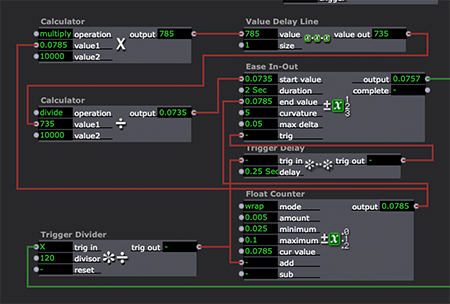
      I think it is a good sign when you can help yourself... solved with some simple calculators.

      Best Wishes

      Russell 

    • brandyB

      Pictures rotate automatically

      picture player • • brandy
      6
      0
      Votes
      6
      Posts
      666
      Views

      DusXD

      @brandy said:

      I'm on Isa 2

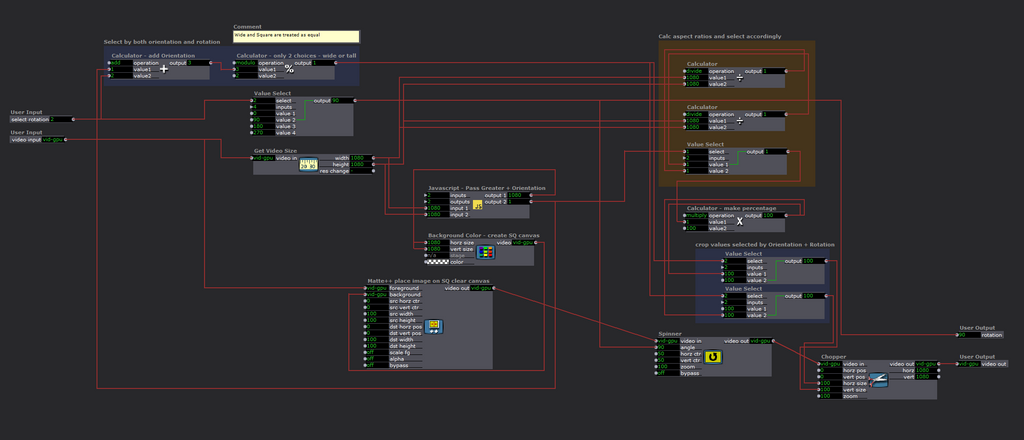
      Unfortunatley the Matte actors in Isadora 2 have a bug related to the 'scale fg' function, that makes it so I can't port this User Actor backwards to Isadora 2.
      Here are the guts of the user actor in case its useful for anyone else to understand.

      The basics are that the image is placed onto (using Matte++) a Square canvas (using the greater of Width or Height).
      Then the square canvas is rotated 90, 180, 270 degrees (as needed). Finally the Square canvas is cropped back down to the image size.

    • E

      match the 3D particle output with the mapping (I used get stage image, but something is wrong)

      • • Erin
      3
      0
      Votes
      3
      Posts
      192
      Views

      E

      @dusx

      Thank you very much for your reply, I see now, I've put the mapping in a user actor, but that mapping does not match with all video' that should be on the bus, therefore it misses a part, when I correct the mapping it does fit. 

    • R

      [ANSWERED] FPS settings in preferences

      • • Reinhard
      3
      0
      Votes
      3
      Posts
      167
      Views

      R

      @michel

      Damn - user errror...

      Thanks a lot!

    • T

      How to see multiple sensors on an Arduino using serial-in watcher?

      arduino code • • trian_glisain
      11
      0
      Votes
      11
      Posts
      1.3k
      Views

      T

      @bonemap https://learn.sparkfun.com/tut... This is the sensor, I still don't know if firmata will work, but I just got it working with the serial in watcher. Just needed to seperate the values and make them Serial.Println like was suggested above. So the code was this. Then in izzy I just needed a second serial in watcher set to 2. 

      #include <SparkFun_ADS1015_Arduino_Library.h>
      #include <Wire.h>

      ADS1015 fingerSensor;

      void setup() {
        
        Wire.begin();
        Serial.begin(115200);
        
        if (fingerSensor.begin() == false) {
           Serial.println("Device not found. Check wiring.");
           while (1);
        } 
        
        fingerSensor.setGain(ADS1015_CONFIG_PGA_TWOTHIRDS); // Gain of 2/3 to works well with flex glove board voltage swings (default is gain of 2)
      }

      void loop() {  
        int data_1;
        int data_2;
        data_1 = fingerSensor.getAnalogData(0);
        data_2 = fingerSensor.getAnalogData(1);
        Serial.print(1, DEC);
        Serial.println(data_1);
         Serial.print(2, DEC);
        Serial.println(data_2);
       delay(50);
        Serial.println();
      }

    • E

      Realsense Mac OS

      • • emullis
      2
      0
      Votes
      2
      Posts
      143
      Views

      markM

      @emullis

      There seems to be some problem, perhaps with the latest firmware for the camera. 

      I am looking into it and will be posting my findings to this thread as I sort out this problem. Please look there for updates.

      I am locking this topic so everyone will gather in the other thread.

      Best Wishes,
      Mark

    • R

      [ANSWERED/PROOF OF CONCEPT] Control Isadora User Interface via Webbrowser?

      • • RL
      22
      0
      Votes
      22
      Posts
      1.7k
      Views

      jfgJ

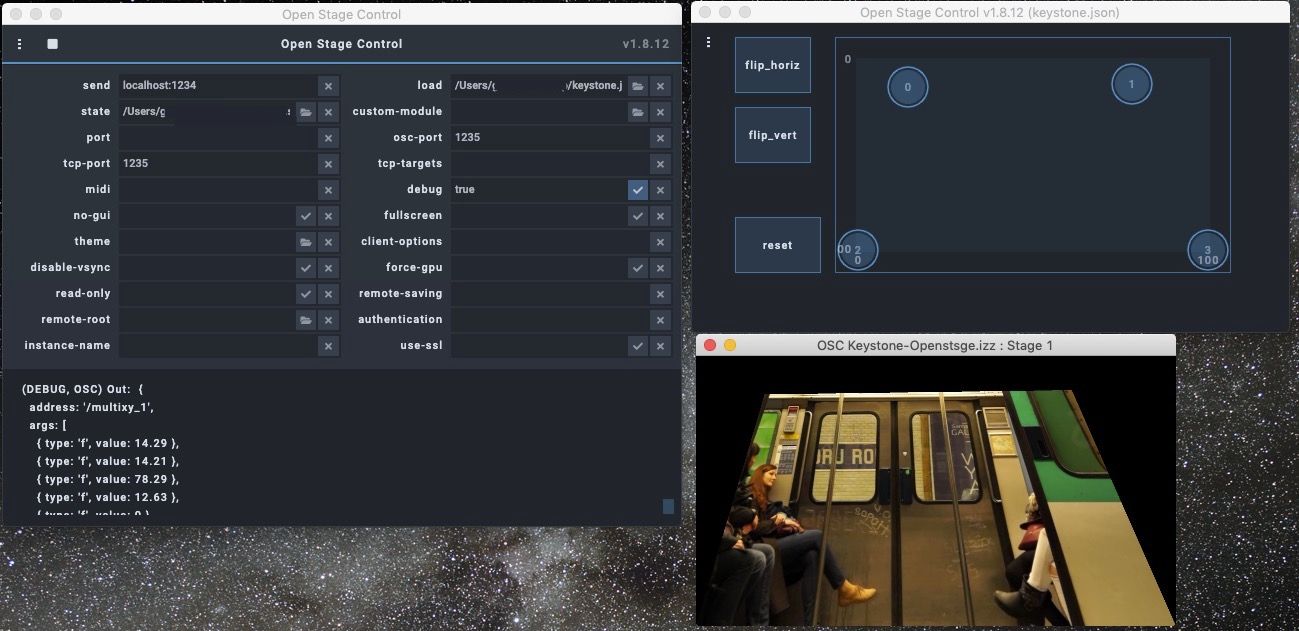
      I have tried Open Stage Control and it runs well and easily with a nice and flexible interface. Just install the software (without any additional installation) and go on. It has similarities with Touch OSC but on smartphones or pads it is "only" usable via web browser (no app). Doesn't run correctly with Safari on Mac but works well on iOS devices.(on Mac Firefox and Chrome are OK)
      Attached is an example of the Global Keystone actor control.

      One advantage over Touch OSC is that you can test buttons, sliders etc. directly on the computer without having to synchronise with the iOS device.

    • JJHP3J

      [SOLVED/UPDATED PLUGINS] v3.0.8 and FFGLs??

      • • JJHP3
      15
      0
      Votes
      15
      Posts
      502
      Views

      markM

      @jjhp3 said:

      Thanks for the quick work! These new FFGLs work great with 3.0.8. - John

      I've put these plugins on the Add Ons page now.

      Best Wishes,
      Mark

    • J

      quicktime replacement

      • • Jarporte
      4
      0
      Votes
      4
      Posts
      186
      Views

      DusXD

      @jarporte

      I generally also have VLC installed on my PC since it will playback Hap Mov files, which the Windows players do not.

    • VidasonikV

      [ANSWERED] Copying patches from scene to scene

      • • Vidasonik
      3
      0
      Votes
      3
      Posts
      202
      Views

      WolandW

      @jfg said:

      with copy and paste
      In the original scene: Left-click and drag to select the actors you want to copyCopyMove to the new scenePaste

      You can also copy and paste whole Scenes inside a file in the Scene List or copy them from one file to another using copy paste.

    • A

      [ANSWERED] How to: Change user actor input to list of names instead internally connected router numbers

      • • Aolis
      6
      0
      Votes
      6
      Posts
      362
      Views

      markM

      @aolis said:

      I would feel guilty making a feature request knowing I can follow the method you provide here and get an index of names displayed. 

      Did it for you. See here.

      Best Wishes,
      Mark