@ril Adrian m and Clair b use software they make themselves. They had released a version of this called emotion a long time ago. I guess they continue working with their own tools.
I think you can get really close to making things like this with little or no investment. You can find or make some videos that simulate tracking camera feeds. This can be done in after effects or blender (blender is great because you can make a scene and render out a few different view posts to show different cameras. You just need to make a moving image/object/body in white on a black background. This can be tough to achieve in real circumstances when you do tracking, and that is one of the costs
You can also then arrange image planes in 3D in isadora and to simulate a real installation. This will let you go quite far, learning how to deal with tracking and make your visuals react. You can also have your outputs ready to feed to projectors.
Making this kind of simulation is very common, other software also provide a wisywig interface as default. Once you have a good simulation it is much easier to get support for a project so you can move on with production. It’s not a great idea to work with all the expensive gear from the start anyway.
Once your simulation and outputs are running you can look to replacing the fake tracking files with real camera input.
Here are some recordings I made with a Kinect to do some tracking training. Some challenges are seeing if you can properly identify bodies even when their paths cross or they pass close to each other. They are also useful for learning to make reactive content from input data.
https://www.dropbox.com/sh/clssqyxk7m0n0b5/AAADxVY0mVuuBFqKxCWGTAr6a?dl=0
There are versions at 2 resolutions, but the footage is from the Kinect depth map so it is 640*480. The high res is good for checking system capability if you use higher resolution cameras to get more smooth detail.
Fred
@GertjanB How's the TailAir treating you? I'm playing with one right now, and NDI into Isadora is working fantastically, but I can't seem to configure the TCP connection for control. Any tips? The documentation and desktop software is pretty sparse, and I just can't work out why I'm not sending commands. I couldn't even get it to work using their own TouchOSC example files, neither the TCP or UDP.
dear All
Have been using V2 software for some years
we produce musicals and project to 3 differant areas on stage
Old software let me line up with a cross grid system which mirrored the stage.
I could also fine tune my key stoning by adjusting number on the set up stage area page
V3 has none of this can anybody help/advise me how to set up projected stages keystoning
Tr742
I'm just guessing, but I had similar issues. Mutable values (the ones with the green connectors) take the ranges from the actor values you connect them to. The same applies to the levels in user actors and their user actor in-/outputs. Upper layers in the chain keep overwriting those settings down to main level and back to the according mutable value. Sometimes I only could change the range values after disconnecting all these connected values to a certain point in the chain and reconnect them with the new range settings. Or I needed to find the actor which caused the issue.
Maybe someone have a more distinct description about this.

Hi there Frank,
Isadora 3.x allows you to do this? I just opened our latest release and I have no issue to sent a negative value of -100 for example
So I fought with a patch for 40 minutes or so before I realized it wasn't working bc I was trying to send a negative number with set and get global values. Set allows negative numbers but the min value in get is 0, and when I tried to change it to a negative number or MIN it reset to 0. Could you fix it so the get global actor can receive a negative number please. Or set the send to a min of 0. Just so they match. Thank you!
@woland. Thanks so much. I was in a session all day today but will dig into this over the weekend. I feel like this is the last bit of difficult logic for my build...the rest of it is straight toggles and dials and faders. I appreciate you wading on this.
Best,
- J
Other things that might be helpful:
- There should be a download link for the file mark used with the Rokoko Suit here: https://support.troikatronix.com/support/solutions/articles/13000100433-guru-session-19-body-tracking-with-the-rokoko-smartsuit-pro-
- The example file for the Rokoko Studio Live Watcher actor may also be a helpful basis for creating a patch: https://troikatronix.com/add-ons/rokoko-studio-live-watcher/
- This lovely line puppet created by the ever-brilliant @bonemap can be found on the TroikaTronix Add-Ons Page: https://troikatronix.com/add-ons/line-puppet/
Best wishes,
Woland
@woland Great, thanks I'll give that a go.
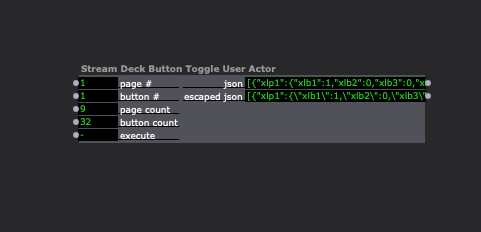
Try this: javascript-stream-deck-button-toggle-2024-02-09-3.2.6.zip
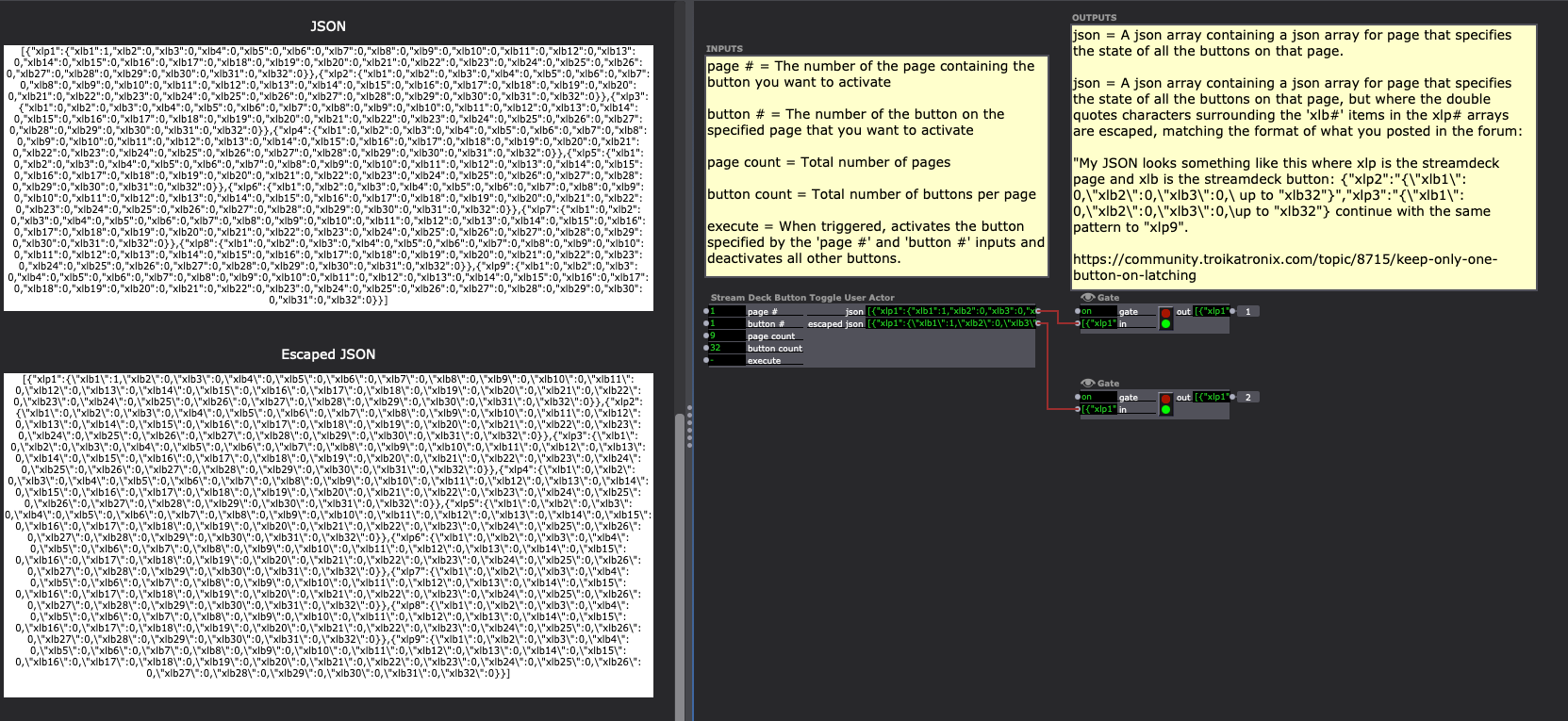
It's a JavaScript User Actor that:
- Lets you define the number of pages and also the number of buttons per page
- Lets you specify a specific button on a specific page you'd like to activate
- Has a trigger input that will turn on the specified button on the specified page and turn off all other buttons
- Outputs a normal JSON array, as well as one that follows the formatting you used in your example where the double quotes around the xlb#'s are escaped but the quotes around the xlp#'s are not.